

How to Use Your Cadillac Adaptive Cruise Control

Long drives on the highway have a way of wearing on a driver, even when traffic is moving smoothly. Maintaining a consistent speed, adjusting for vehicles that merge ahead of you, and staying alert through repetitive stretches of road adds up to real fatigue over time.
Adaptive cruise control exists to take a meaningful portion of that workload off your hands, and Cadillac's implementation of the technology is one of the more capable systems available in its segment. If you've recently purchased a Cadillac or you're considering one and want to understand what the system actually does in practice, this breakdown covers everything you need to know about using it effectively.
What Is Cruise Control?
Before getting into the adaptive version, it helps to understand the baseline. What is cruise control in its traditional form? Standard cruise control is a system that holds your vehicle at a set speed without requiring continuous input from the accelerator pedal.
| Feature | Standard Cruise | Adaptive Cruise |
|---|---|---|
| Speed Maintenance | Constant Speed Only | Variable Based on Traffic |
| Traffic Detection | Manual Adjustment Needed | Radar & Camera Monitoring |
| Braking | Manual Only | Automatic Distance Management |
The Adaptive Difference
Cadillac Cruise Control in its adaptive form uses a forward-facing radar sensor and camera system to monitor the distance between your vehicle and the vehicle ahead. When the system detects a slower vehicle in your path, it automatically reduces your speed to maintain a safe following distance.
Setting Up and Activating the System
Step 01
Power On
Bring your vehicle up to your desired highway speed. Press the cruise control button (typically on the left side of the steering wheel) to wake the system up.
Step 02
Set Speed
Press the Set button to lock in your current speed. The instrument cluster will display a confirmation that the system is active.
Step 03
Adjust Gap
Use the gap adjustment controls to set the maintained space. Most systems offer multiple time-based intervals for comfort.
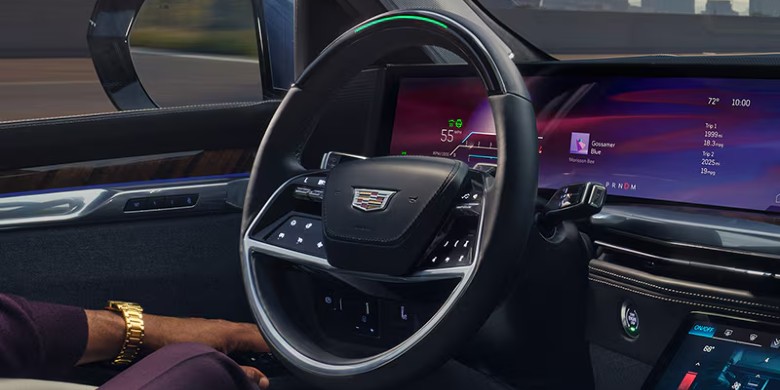
To increase or decrease your set speed, use the plus and minus buttons on the steering wheel. Each press adjusts your target speed in one mile-per-hour increments, or you can hold the button for faster adjustments.
To disengage the system, tap the brake pedal, press the cancel button, or press the cruise control power button. The system will deactivate and return full throttle control to you immediately.
The Future: Super Cruise
On higher trim levels and in Cadillac models equipped with Super Cruise, the system goes even further by incorporating lane centering assistance, turning certain highway segments into a nearly fully automated driving experience within clearly defined operational boundaries.

Things Worth Knowing Before You Rely On It
Adaptive cruise control is a driver assistance tool, not a replacement for attentiveness. It performs best on well-marked highways in clear weather conditions. Heavy rain, snow, or debris can interfere with sensor performance. The system also has limitations at very low speeds in stop-and-go traffic unless your specific model includes low-speed follow capability.
Always keep your hands available and your attention on the road regardless of what the system is managing.
See Adaptive Cruise in Action
If you'd like to see Cadillac's adaptive cruise control demonstrated in person, the team at Coulter Camelback Cadillac is available to walk you through it on any vehicle on the lot. Stop by our lot or check our website to see our current vehicle inventory.

